6 TrafficBotPro Alternatives Mistakes to Avoid With CTR Tools
You picked a TrafficBotPro alternative, ran your CTR campaign, and the rankings did not move. The problem is often not the tool you switched to but the same six setup mistakes carried over with it.
This article explains what CTRTool is, whether those six mistakes apply to it, and where its campaign rules and screenshot proof set it apart. You will also see its credit-based pricing, its limits, and who should actually use it before you commit.
What Is CTRTool? The CTR Tool Behind the Alternatives Question
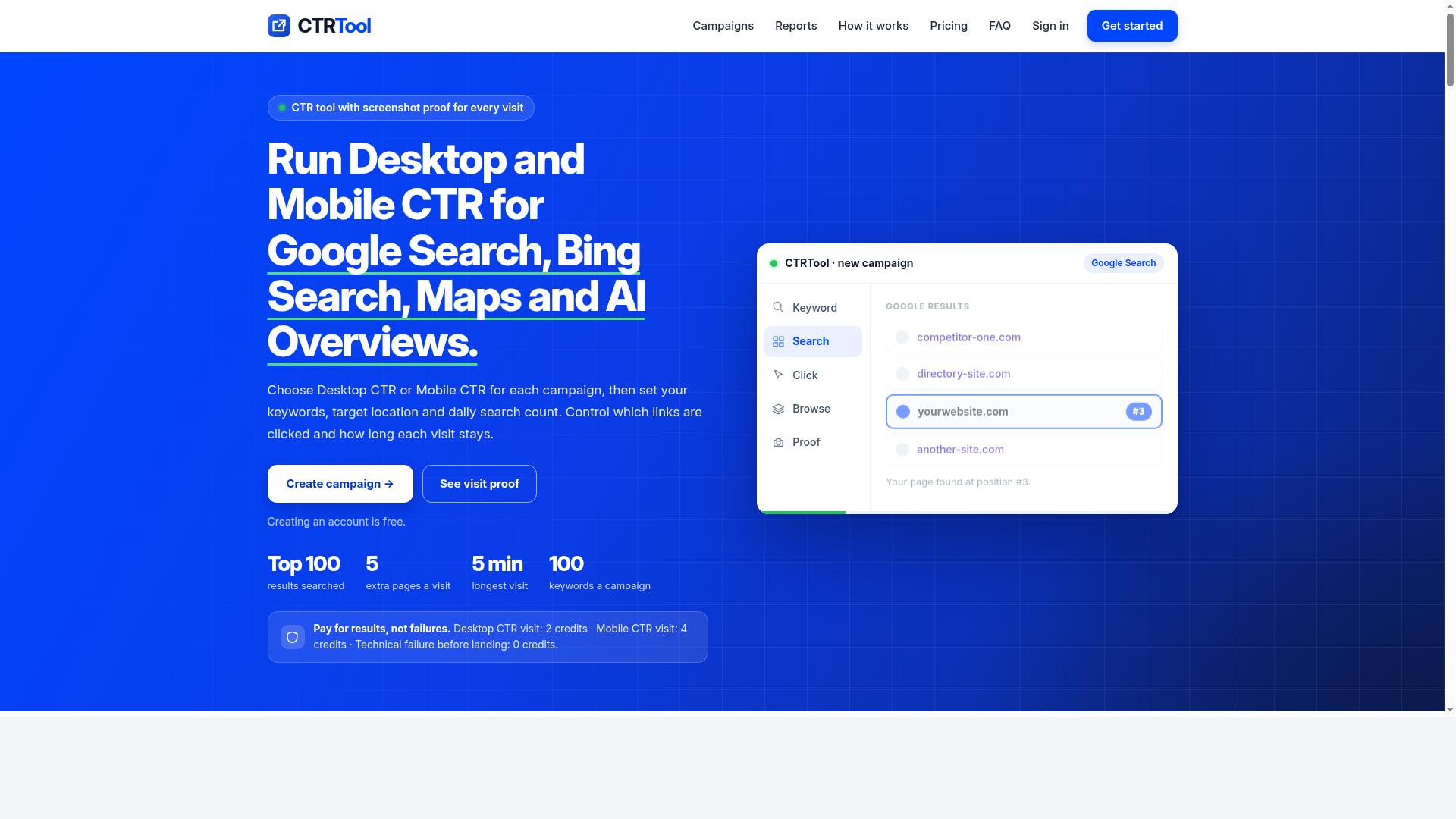
CTRTool is a SaaS platform that runs Desktop and Mobile CTR campaigns for Google Search, Bing Search, Maps, and AI Overviews, with screenshot proof for every visit. It is a structured campaign system, not a generic traffic bot, which is the distinction that matters most when people compare CTR tools and their alternatives.
The platform is built around a simple idea: every visit should be verifiable. Users choose Desktop CTR or Mobile CTR per campaign, so the device profile of each visit matches the context of the search. That choice is made at the campaign level, not left to chance.
Within each campaign, users set keywords, a target location, and a daily search count. They also control which links are clicked and how long each visit stays. That level of control separates a campaign tool from raw bot traffic, where outcomes are unpredictable and hard to audit.
CTRTool also tracks keyword positions over time. Because campaigns are tied to specific keywords and locations, users can watch how those positions move as a campaign runs. The screenshots attached to each visit act as evidence that the campaign actually executed as configured.
The brand is direct about limits. Its site states: "Automated visits do not guarantee rankings." CTRTool is positioned as a tool for running and documenting click-through rate campaigns, not as a shortcut that promises page one results.
That honesty is worth keeping in mind when reading about TrafficBotPro alternatives. Many SEO mistakes come from expecting a CTR tool to replace keyword research, search intent alignment, or landing page optimization. CTRTool does not claim to do those jobs. It handles campaign execution and proof, and it leaves strategy to the user.
So the alternatives question is really about fit. CTRTool suits users who want device-level control, location targeting, and a record of every visit across Google Search, Bing Search, Maps, and AI Overviews. It is not a generic traffic bot, and it does not pretend to be one.
Do the 6 TrafficBotPro Alternatives Mistakes Apply to CTRTool? The Direct Answer
The six common mistakes often cited in TrafficBotPro alternative discussions, such as lack of proof, opaque targeting, and weak bot detection, do not all apply to CTRTool, but some limits remain. The usual concerns include missing visit proof, unclear targeting rules, poor bot detection, unrealistic engagement metrics, no position tracking, and vague pricing.
CTRTool directly addresses several of these through screenshot proof, transparent campaign rules, and position tracking. Still, users should evaluate its limits before switching.
Where CTRTool Avoids the Common Mistakes
CTRTool avoids the common mistakes by providing screenshot proof for every visit, tracking keyword positions over time, and enforcing clear campaign rules such as top 100 organic results and location targeting. Search and landing screenshots are delivered as separate proof images, so each visit can be checked rather than taken on trust.
Full visit paths add another layer. A visit can last up to 5 minutes and include up to 5 additional internal pages, which gives user behavior analytics a more realistic shape than a single page load. This matters when teams review session duration and bounce rate patterns.
Position tracking covers more than classic organic rankings. CTRTool tracks Maps listing order and AI citation order over time, so changes can be observed across result types, not just the standard SERP.
The rules themselves are stated openly, which reduces the opacity and fraud concerns often tied to traffic bots:
- The page must appear within the top 100 organic results for the chosen keyword and location
- Maps campaigns check up to 50 listings, about five pages
- AI Overview campaigns need a matching citation link
The credit model is also pay-for-results. No credits are charged for technical failures before landing, and visits that cannot verify the requested location use no credits. One balance is shared across all campaign types, websites, and keywords, with up to 100 campaigns and 100 keywords each.
Limits to Know Before You Switch
Before switching, users should understand CTRTool's campaign requirements: the target page must rank within the top 100 organic results for the chosen keyword and location, Maps campaigns check up to 50 listings, and AI Overview campaigns require a matching citation. These are practical constraints, not marketing fine print.
The top 100 requirement means pages sitting outside that range for a given keyword and location cannot be targeted. Keyword research and location selection therefore need to match what the page actually ranks for, not what the team hopes it ranks for.
For Maps campaigns, the 50-listing check covers roughly five pages of results. A business listing that falls beyond that window is out of scope. AI Overview campaigns are narrower still, since a matching source link must exist for the citation to qualify.
These rules mean CTRTool is not a free-for-all traffic bot but a constrained CTR tool. That constraint is part of why the visits carry proof, but it also means users should confirm their pages and listings meet the criteria first.
Two more points belong in any honest evaluation. Daily goals reset at 00:00 UTC, and CTRTool explicitly does not guarantee higher rankings, leads, or sales. It is a tool for influencing click-through rate and engagement signals within defined rules, not a promise of outcomes. Teams that plan around these limits will find the fit clearer from day one.
Key Features That Separate CTRTool From Typical Alternatives
CTRTool separates itself from typical alternatives through four campaign types, Google Search CTR, Bing Search CTR, Google Maps CTR, and AI Overview CTR, each with Desktop or Mobile selection and screenshot proof. That structure matters when you are comparing TrafficBotPro alternatives, because most tools sell volume while offering little evidence of what actually happened during a visit.
A typical alternative sends generic traffic to a URL and reports a visit count. CTRTool instead asks you to define the exact search behavior, then documents the outcome with search and website screenshots for every visit.
1. Four campaign types. Each campaign type mirrors a distinct discovery path:
- Google Search CTR: search a keyword, click the organic result, and reach internal pages.
- Bing Search CTR: the same keyword and click flow on Bing.
- Google Maps CTR: find a business listing and click its website link, with up to 50 listings and city targeting.
- AI Overview CTR: find your website in the overview and click its source link.
Generic traffic tools rarely distinguish between these paths. That gap is one of the common SEO mistakes when teams assume a click from any source behaves like a click from a specific one.
2. Desktop or Mobile per campaign. Device choice is set per campaign, so a mobile-heavy audience can be matched with mobile sessions rather than a blended mix. CTRTool delivers through Desktop Chrome windows and real Android phone sessions matched to the target location through managed proxy routes.
3. Keyword and location targeting. Campaigns support up to 100 keywords, country, state, and city targeting, or Any country, with search depth up to 100. Daily search counts can run now, spread out, or with a gap, alongside days, hours, and time zone settings. Daily goals reset at 00:00 UTC.
4. Screenshot proof for every visit. Screenshots of the search and the website accompany visits, giving you a record rather than a bare counter. Alternatives that lack proof leave you guessing whether the click landed on the intended page.
5. Full visit paths. You can set the target URL, internal page URLs, link text, click order, and scrolling time, with up to five additional pages per visit and visits up to five minutes total. Reports show the full path taken, which is far more useful for reading engagement metrics than a single pageview figure.
6. Keyword position tracking. Reports track keyword positions over time across Search positions, Maps listing order, and AI citation order. This closes the loop between the click you requested and the ranking you are trying to influence.
Custom form filling or other custom actions are available through support with a separate agreed one-time fee. Taken together, these features shift CTRTool from a traffic generator into a measurable campaign tool, which is the distinction that matters most when evaluating any alternative software in this category.
Pricing and Plans: Pay-for-Results Credits Explained
CTRTool uses a credit-based pricing model with monthly plans: Starter at $59/month for 2,000 credits (up to 1,000 Desktop CTR visits or 500 Mobile CTR visits) and Growth at $125/month for 5,000 credits (up to 2,500 Desktop or 1,250 Mobile visits).
This structure matters when you compare TrafficBotPro alternatives, because credit math is where many SEO mistakes begin. If you misjudge how many credits a campaign needs, you either overspend on a plan you don't use or underdeliver visits against your target.
The core rule is simple: credits are consumed per visit, and the device type changes the cost. A Desktop CTR visit costs 2 credits, while a Mobile CTR visit costs 4 credits. That is why the same allowance splits unevenly between the two formats.
- 2,000 credits = up to 1,000 Desktop visits or 500 Mobile visits
- 5,000 credits = up to 2,500 Desktop visits or 1,250 Mobile visits
- 20,000 credits = up to 10,000 Desktop visits or 5,000 Mobile visits
- 40,000 credits = up to 20,000 Desktop visits or 10,000 Mobile visits
Two edge cases protect your budget. A verified search without a match costs just 1 credit, and a technical failure before landing costs 0 credits. That means failed deliveries don't quietly drain your balance.
| Plan | Monthly Price | Credits | Up to Desktop Visits | Up to Mobile Visits |
|---|---|---|---|---|
| Starter | $59/month | 2,000 | 1,000 | 500 |
| Growth (Recommended) | $125/month | 5,000 | 2,500 | 1,250 |
| Scale | $399/month | 20,000 | 10,000 | 5,000 |
| Agency | $699/month | 40,000 | 20,000 | 10,000 |
Growth is marked Recommended, and it is the natural middle ground for most campaigns. Starter suits a single test, while Scale and Agency serve heavier volumes. Creating an account is free, so you can review the plans before committing.
One timing detail deserves attention. The site shows limited launch pricing, with prices rising 30% on November 15. If you are weighing an alternative software purchase, locking in the current rate early is the smarter move.
The "pay-for-results" label is accurate in a specific sense: you pay for visits delivered, and each visit comes with screenshot proof. That evidence is what separates a measurable CTR tool from a traffic bot you simply have to trust.
Unused credits roll over while your subscription is active, but they expire when cancellation takes effect. Plan your monthly volume with that rule in mind, and you avoid the common mistake of stockpiling credits you can never spend.
Custom development is quoted separately as an agreed one-time fee, so it does not interfere with your monthly credit budget. Read the plans as visit allowances, not abstract numbers, and the pricing becomes easy to judge.
Trust Signals: Screenshot Proof and Transparent Campaign Rules
CTRTool builds trust through screenshot proof for every visit, search and landing screenshots as separate proof images, and transparent campaign rules that specify ranking and listing requirements. That combination matters because anyone evaluating traffic bots or CTR tools should be able to confirm that a visit actually happened and that it matched the campaign brief.
Without that evidence, users are left guessing whether a campaign delivered real activity or inflated numbers. Verifiable proof turns a vague promise into something a user can check, visit by visit.
Each visit in CTRTool carries two distinct proof images. The search screenshot shows the query and the result position, while the landing screenshot confirms the page the visitor reached. Keeping them separate means neither stage can hide behind the other.
This is where many TrafficBotPro alternatives fall short. A single screenshot or a bare visit count tells you little about what happened between the search and the page load. Separate images close that gap.
CTRTool also records full visit paths, with visits running up to 5 minutes and up to 5 additional internal pages. A path shows where a visitor went after landing, not just that a click occurred.
That detail supports user behavior analytics. Longer, multi-page sessions tend to look more natural in engagement metrics such as session duration and bounce rate than a single-page hit and exit.
For anyone worried about click fraud or invalid traffic, a visible path is a practical check. It shows the visit behaved like a browsing session rather than a one-off event.
Ranking position is tracked over time, including Maps listing order and AI citation order. This lets users see whether a keyword moved and whether the visit matched the intended placement.
Tracking over time also separates a real trend from a single day's noise. A keyword that holds its position across multiple checks is stronger evidence than one snapshot.
For keyword research and SERP ranking work, that history is useful context. It ties each campaign back to the position it was meant to target.
The campaign rules are stated up front rather than buried in fine print. CTRTool defines the ranking and listing requirements a visit must meet, so users know the criteria before a campaign runs.
- Visits target top 100 organic results
- Maps campaigns cover up to 50 listings
- AI Overview campaigns use citation matching
Clear rules reduce disputes about whether a visit qualified. If a visit cannot verify the requested location, no credits are used, and technical failures before landing are not charged under the pay-for-results credit model.
Together, screenshot proof and stated rules give users a way to audit results instead of trusting a dashboard total. That is the core difference between a credible CTR tool and one that only reports numbers.
Who Should Use CTRTool
CTRTool is designed for SEO practitioners and agencies running CTR campaigns for their own or client websites across Google Search, Bing Search, Google Maps, and AI Overviews. That scope matters because it covers the surfaces where click-through rate and SERP ranking signals actually play out.
This is not a general-purpose traffic toy. It is a campaign tool built around search and map visibility, which shapes both who benefits from it and who should look elsewhere.
SEO practitioners and agencies are the clearest fit. If you manage campaigns for multiple properties, whether your own or a client's, CTRTool is positioned around that workflow. Agencies in particular need to show clients what happened, not just assert that something ran.
Users who need proof of visits for reporting also belong here. Screenshot-based evidence and position tracking support client-facing reports, and multi-platform campaigns mean one workflow can cover several search surfaces instead of four disconnected ones.
Compliance deserves a direct note. The site's guidance references tier links, PBNs, and test properties, so anyone using CTRTool should check that these tactics align with their own compliance standards and their clients' expectations before running anything.
Who might not benefit? Someone looking for unconstrained traffic bots with no reporting structure or campaign boundaries. CTRTool is framed as a managed CTR campaign tool, not an open traffic generator, so that expectation mismatch is worth resolving before you commit.
The practical test is simple. If your goal is measurable click-through rate work across Google Search, Bing Search, Google Maps, and AI Overviews, with proof you can hand to a client, CTRTool fits that brief. If you want raw volume with no accountability, it is the wrong category of tool.
Final Verdict
CTRTool is a credible alternative for SEOs who need screenshot-proof CTR campaigns across Google, Bing, Maps, and AI Overviews, provided they can meet the ranking and listing requirements. It is not a magic button for instant visibility. It is a structured tool that rewards preparation.
The core appeal is verifiable proof. Campaigns are documented with screenshots, so practitioners can show clients or stakeholders exactly what was delivered. That level of transparency sets it apart from vague promises common in the click-through rate tool space.
Support for multiple platforms also matters. Running campaigns across several surfaces keeps engagement metrics and user behavior signals consistent, rather than fragmented across separate tools.
The tool does carry real limits, and buyers should weigh them honestly.
- Top 100 requirement: campaigns depend on the target already ranking within the top 100 results.
- Maps listing cap: Google Maps campaigns are subject to a listing limit.
- AI citation matching: AI Overview campaigns rely on citation matching, which constrains what can be targeted.
These are not flaws so much as boundaries. They mean CTRTool works best as part of a broader SEO strategy built on solid keyword research and genuine search intent alignment, not as a standalone fix.
The right buyer is an agency or practitioner who values proof and structured campaign execution. If you need documented results to justify spend and keep clients informed, the screenshot-based approach fits that need well. Multi-platform coverage adds further value for teams managing several surfaces at once.
The tool is not designed for unrestricted bot traffic. Anyone hoping to flood a site with raw clicks from traffic bots will be disappointed. CTRTool is built around measurable, accountable campaigns, and that focus is precisely what makes it trustworthy.
For questions about requirements or setup, support is reachable at vaibhav@autoblogging.ai. The site also lists Sign in, Create an account, Support, Terms of use, and Legal notices pages. Overall, CTRTool earns a clear recommendation for SEOs who want transparent, provable CTR campaigns, and it is a poor fit only for those chasing unaccountable bot traffic.
Frequently Asked Questions
What should I check before choosing a TrafficBotPro alternative for CTR campaigns?
Start by confirming which surfaces the tool actually supports, since many alternatives focus on one channel only. CTRTool runs Desktop and Mobile campaigns for Google Search, Bing Search, Maps and AI Overviews, so you can consolidate your CTR work in one place. Also verify how visits are proven before you commit.
Why does screenshot proof matter when comparing CTR tools?
Without proof, you can't tell whether a visit actually happened or whether your keyword and landing page were reached as intended. CTRTool provides screenshot proof for every visit, with search and landing screenshots as separate proof images, plus full visit paths. That makes it easier to audit results and report to clients with confidence.
How many credits will I actually need for desktop versus mobile campaigns?
Credit consumption differs by device type, so estimate your visit volume before picking a plan. With CTRTool, the Starter plan at $59/month includes 2,000 credits (up to 1,000 Desktop CTR visits or 500 Mobile CTR visits), and the Growth plan at $125/month includes 5,000 credits (up to 2,500 Desktop or 1,250 Mobile visits). Map your expected monthly visits to these figures rather than guessing.
Can I target a specific country or city with my CTR campaign?
Location targeting is a common oversight when switching tools, especially for local SEO work. CTRTool lets you target a chosen country and optionally a state and city, or select "Any country" to use a mix of supported locations. This matters most for Maps campaigns, where local relevance drives results.
What are common mistakes with Maps and AI Overview campaigns?
For Maps, the tool must be able to find your business listing, and CTRTool checks up to 50 listings (about five pages) during Maps campaigns. For AI Overviews, campaigns need a matching source link, so make sure your page is properly set up before launching. Skipping these prerequisites is a frequent reason campaigns underperform.
How do I know my keyword is eligible for a CTR campaign?
Your page must appear within the top 100 organic results for the chosen keyword and location, so check rankings first. CTRTool tracks keyword positions over time, including Maps listing order and AI citation order, which helps you spot eligibility issues early. If you need help, support is available at vaibhav@autoblogging.ai.